Kubernetes Gateway API
Do you remember the good old days when you’re trying to grasp on how you can make your applications accessible from outside of the kubernetes cluster?
To even provision, setting up a working kubernetes cluster and deploying containerized apps is an amazing feeling.
Everything went well and all pods showed status running. You’ve got really excited, but now what? you asked.
Your apps are already running.
But how do you even access your application services exactly?
Then you started to dive into the kubernetes documentations, reading about the kubernetes service and its type.
Kubernetes Service Type
By default, kubernetes service will use ClusterIP as its service type. If you don’t specify type in your Service manifest, Kubernetes will assume ClusterIP. What does ClusterIP do?
- It creates a stable internal IP address for the service.
- It’s only accessible inside the cluster (i.e. other pods, nodes in the cluster can use it, but it’s not exposed externally).
You found out about service type NodePort which is one of some ways to expose your application so it becomes accessible from outside of the cluster. Setting up NodePort service means it will open up exactly the same port on every node available in the cluster, which is not quite good. Besides, now you need to do load balancing for each node, you said.
Moving on, you read about the LoadBalancer service type that turns out to be more ideal. Considering it only has a single endpoint and not opening many ports in kubernetes nodes.
But, it is only supported out of the box by kubernetes managed services like GKE, EKS, AKS etc and it also introduces cost.
For on-premise or self setup kubernetes? You’re gonna need additional platform tools such as MetalLB that will handle Layer 2 load balancer.
Kubernetes Ingress
Service type LoadBalancer is good, and there is an even better way to expose your service by leveraging service type LoadBalancer and putting some kind of reverse proxy on top of your services.
Yeay! Now you get to know the Kubernetes Ingress, and then you start to deploy your first ingress controller.
The most commonly used ingress controller would be the ingress-nginx (not to be confused with nginx-ingress, because those two are different project). There is also another controller like emissary-ingress for example. Which is an already graduated project from CNCF, it’s using envoy proxy as its dataplane and it offers more advanced features that you could also consider.
Kubernetes Ingress Limitations
Everything went great until you faced the kubernetes ingress limitations.
For many workloads, a basic Ingress resource with an Ingress controller like ingress-nginx is perfectly fine.
But once your use cases grow, you may encounter some of these limitations:
Limited L7 Routing Flexibility
Kubernetes Ingress resources support basic HTTP path and host-based routing.
But advanced use cases like routing based on headers, cookies, or complex rules often require custom annotations, CRDs, or even different controllers entirely.
No Native Support for TCP/UDP
Standard Ingress only handles HTTP and HTTPS traffic. If you need to expose TCP or UDP services, you’re out of luck without extra configuration. Some controllers let you add custom config maps to support these protocols, but it’s not built-in to the Ingress spec itself.
Controller-Specific Annotations and Features
Each Ingress controller has its own set of annotations, which means you’re effectively locked into that controller’s implementation.
If you switch controllers, your YAML manifests may not work without modification.
Limited Observability and Policy Control
Out of the box, Ingress offers basic metrics (like requests and errors), but advanced observability, rate limiting, authentication, and policy control usually need extra tooling or enterprise add-ons.
No Standard for Load Balancer Integration
While Service type LoadBalancer typically provisions cloud load balancers, Ingress itself doesn’t standardize how external LB integration should work. Some Ingress controllers help with this, but it’s another area of controller-specific behavior.
If you hit the ingress limitations, don’t worry, Kubernetes has evolved to address them!
Introducing the Kubernetes Gateway API
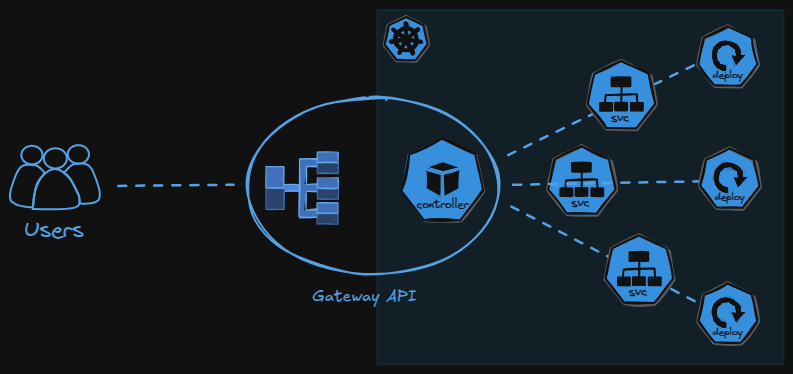
Now let’s get to know the Kubernetes Gateway API (not to be confused with API Gateway, explanation here), a current standardized way to better expose our kubernetes service inside our cluster.
Gateway API is the proper, more powerful, and extensible way to define network traffic routing into your cluster.
It was designed to fix many of the Ingress shortcomings:
- Standardized advanced routing (including headers, query params, etc.)
- Built-in support for TCP, UDP, and even TLS termination in a unified API
- Decoupling of infrastructure (GatewayClass, Gateway) and routing rules (HTTPRoute, TCPRoute, etc.)
- Controller-neutral spec that makes your manifests portable
Many popular controllers now support the Gateway API, you can take a look at the list here.
Let’s Cook!
My cooking table setup:
- Kubernetes distro: KIND cluster
- GitOps tools: FluxCD
- LoadBalancer: MetalLB
- Gateway Controller: Envoy Gateway
- Certificate Manager (for https): Cert Manager
- Source Code Repository: dodistyo/kivotos
Pre-configuration
Make sure all platform component are deployed and configured (metallb, envoy gateway and cert-manager).
I’ve also setup my custom hostname app.me to point out to the gateway api service, so later we can access it with app.me as the base url for our testing.
Resource deployments
Let’s deploy our example services which consists of services that serving on tcp/udp, an http and a grpc.
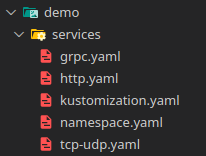
Now let’s deploy our gateway api resources, we need to setup GatewayClass and Gateway resources for our Gateway API platform configurations.
We apply it on namespace platform
apiVersion: gateway.networking.k8s.io/v1
kind: GatewayClass
metadata:
  name: envoy-gateway
  namespace: platform
spec:
  controllerName: gateway.envoyproxy.io/gatewayclass-controller
---
apiVersion: gateway.networking.k8s.io/v1
kind: Gateway
metadata:
  name: main-gateway
  namespace: platform
spec:
  gatewayClassName: envoy-gateway
  listeners:
    - name: http
      protocol: HTTP
      port: 80
      allowedRoutes:
        namespaces:
          from: All
    - name: https
      protocol: HTTPS
      port: 443
      allowedRoutes:
        namespaces:
          from: All
      tls:
        mode: Terminate
        certificateRefs:
          - kind: Secret
            name: selfsigned-tls
            group: ""
    - name: tcp
      protocol: TCP
      port: 8080
      allowedRoutes:
        kinds:
        - kind: TCPRoute
        namespaces:
          from: All
    - name: udp
      protocol: UDP
      port: 8081
      allowedRoutes:
        kinds:
        - kind: UDPRoute
        namespaces:
          from: All
    - name: grpc
      protocol: HTTPS
      port: 50051
      allowedRoutes:
        namespaces:
          from: All
      tls:
        mode: Terminate
        certificateRefs:
          - kind: Secret
            name: selfsigned-tls
            group: ""
Then we apply resources for mapping and routing our demo services.
ReferenceGrant: We need this to grant access to our gateway api, because our gateway api platform resources are in the different namespace as our gateway resources for mapping and routing our servicesTCPRouteandUDPRoute: For routing to our tcp/udp server- Two
HTTPRoute: For routing to our http server, the other one is just for https redirection. GRPCRoute: For routing to our grpc server
apiVersion: gateway.networking.k8s.io/v1beta1
kind: ReferenceGrant
metadata:
  name: allow-demo-to-platform
  namespace: platform
spec:
  from:
    - group: gateway.networking.k8s.io
      kind: HTTPRoute
      namespace: demo
  to:
    - group: gateway.networking.k8s.io
      kind: Gateway
      name: main-gateway
---
apiVersion: gateway.networking.k8s.io/v1
kind: HTTPRoute
metadata:
  name: http-to-https-redirect
  namespace: demo
spec:
  parentRefs:
  - name: main-gateway
    sectionName: http
    namespace: platform
  hostnames:
  - "app.me"
  rules:
  - filters:
    - type: RequestRedirect
      requestRedirect:
        scheme: https
        statusCode: 301
---
apiVersion: gateway.networking.k8s.io/v1
kind: HTTPRoute
metadata:
  name: https-server-route
  namespace: demo
spec:
  parentRefs:
  - name: main-gateway
    namespace: platform
    sectionName: https
  hostnames:
  - "app.me"
  rules:
  - matches:
    - path:
        type: PathPrefix
        value: /http-echo
    backendRefs:
    - name: http-echo
      namespace: demo
      port: 80
---
apiVersion: gateway.networking.k8s.io/v1alpha2
kind: TCPRoute
metadata:
  name: tcp-app-route
  namespace: demo
spec:
  parentRefs:
  - name: main-gateway
    namespace: platform
    sectionName: tcp
  rules:
  - backendRefs:
    - name: tcp-udp-service
      namespace: demo
      port: 8080
---
apiVersion: gateway.networking.k8s.io/v1alpha2
kind: UDPRoute
metadata:
  name: udp-app-route
  namespace: demo
spec:
  parentRefs:
  - name: main-gateway
    namespace: platform
    sectionName: udp
  rules:
  - backendRefs:
    - name: tcp-udp-service
      namespace: demo
      port: 8081
---
apiVersion: gateway.networking.k8s.io/v1
kind: GRPCRoute
metadata:
  name: grpc-route
  namespace: demo
spec:
  parentRefs:
  - name: main-gateway
    namespace: platform
    sectionName: grpc
  hostnames:
  - "app.me"
  rules:
  - backendRefs:
    - name: grpc-hello-service
      namespace: demo
      port: 50051
Now let’s have a taste!
Testing
TCP/UDP server test using netcat

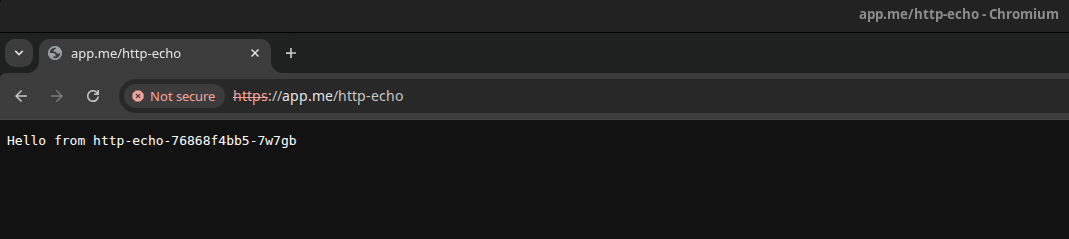
HTTP server test.
And look…
It automatically redirected to https, even though it’s using self-signed certificate.
But hey chill, it’s only for testing.
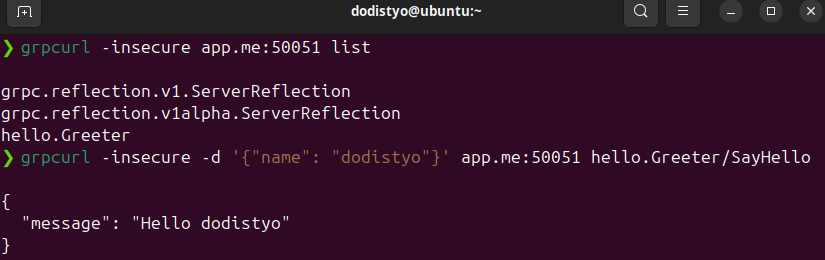
gRPC server test using grpcurl