Take Your Dev Setup Anywhere with CDE
Do you enjoy setting up a development environment each time you switch devices?
Well, I don’t…
Setting up workspace can be tedious, especially when you got a new device or just simply often switching for devices.
It could take hours or even days to install all of the necessary tooling, and set up the IDE and its extensions.
If you’re a psycho, you’ll probably be using neovim as your IDE with 500+ lines of init.lua, custom LSP, treesitter, and a Tokyo Night colorscheme. Keyboard shortcuts so advanced even you forget them. Brags about how you wrote your own plugin manager or something…
But of course, you are a normal person, so you use VSCode instead. Installing it in your desktop is pretty simple and quick. Setting up VSCode extensions is usually on the go too. If you’re on linux or mac, maybe using zsh as your shell terminal is a good choice, as it will surely increase your productivity. On Windows, though, you’ll need to set up WSL first to use zsh smoothly. And you still need to install a bunch of other tooling to support your work. Could you imagine if you switch devices often? keeping your workspace consistent across devices is not an easy task.
Now you’re thinking…
And then realize that VSCode is actually built with JavaScript. Since it is built with JS, it should be possible to run it in the browser, right?
Cloud Development Environment
Have you used GitHub Codespace for coding? GitHub Codespace is awesome. The user experience is near identical with VSCode Desktop. We can even directly expose and access your developed application by involving some proxying and port forwarding. GitHub Codespace is considered a CDE. And another CDE worth the mention is Gitpod.
A Cloud Development Environment is a remote-accessible coding workspace hosted on cloud or self-hosted infrastructure, allowing developers to write, build, and test software from anywhere using just a browser or lightweight client.
As we know it, Codespace is tightly integrated with GitHub services. and it is not opensource.
Is there any self-hosted/opensource alternative?
You might think hosting VSCode OSS in the browser is possible since it is made out of javascript.
Unfortunately, we can’t natively run VSCode in the browser. Since it was built using electron and specifically targeting desktop.
But don’t worry. There are some projects being developed around VSCode. To keep the main VSCode experience and features, they’re developing them by forking the core component of the original VSCode OSS project. Some popular projects including openvscode, which is the data plane component used by GitHub Codespace and Gitpod.
There is another interesting project called code-server (also VSCode fork). As for now, it has stronger community support compared to openvscode. But basically, they both over self-hosted VSCode that is accessable via browser.
Cool, right?
But there is no way we will host a single server for each developer.
It’s not feasible. We need some kind of management tool for managing developer workpace.
In this blog, we’ll take a look at the opensource project called Coder. Coder is a CDE platform that can be self hosted.
By the way, coder team is also the maintainer of the code-server project. and code-server is part of the coder component.
Kubernetes as CDE Orchestrator
By leveraging the dynamic and the robustness of kubernetes, we’ll get a strong platform to host your CDE manager and it’s workspace data plane. We will provision the coder controller first, then we will create a workspace template so users can use the template and spawn their workspace dynamically on demand.
Before we do the demo, here are some coder OSS key features:
Core Features of Coder OSS
Self-Hosted Cloud Development Environments
Run locally or in your cloud infrastructure (AWS, GCP, Azure, on-prem). Self-host all components for full control and no vendor lock-in.Consistent Dev Environments via Templates
Define standardized workspace templates (Docker, Kubernetes, VMs) using Terraform to ensure all developers work in identical environments.IDE Flexibility
Supports web-based IDEs like code-server and JetBrains Projector, plus desktop IDEs via SSH (VS Code Remote, JetBrains Gateway, Emacs, Jupyter, etc.).Ephemeral + Persistent Workspace State
Workspaces have ephemeral resources (e.g., runtime, secrets) and persistent ones (e.g., source code, dotfiles). When stopped, only persistent state remains, saving resources.Cost Control via Auto-Shutdown
Automatically stops inactive workspaces to reduce cloud costs while preserving the persistent workspace disk.Web UI, CLI & API Access
Provision and manage workspaces via web dashboard, command-line interface, or API—usable by both admins and developers.Wide Platform Support
Supports Linux, Windows, macOS, and ARM architectures. Workspaces can run as VMs, containers, or Kubernetes pods.Open Source License & Community Edition
Licensed under AGPL-3.0, offering unlimited templates, workspaces, members, IDE integrations, AI agents, and community support for free.
Demo
Setup:
- Kubernetes distro: KIND cluster
- GitOps tools: FluxCD
- LoadBalancer: MetalLB
- Gateway Controller: Envoy Gateway
- Certificate Manager (for https): Cert Manager
- CDE: Coder
- Postgresql: Bitnami Postgresql
- Source Code Repository: dodistyo/kivotos
Pre-configuration
Make sure all platform component are deployed and configured (metallb, envoy gateway and cert-manager).
I’ve also setup my custom hostname app.me to point out to the gateway api service, so later we will expose coder and will access it with url coder.app.me.
Resource deployments
If you don’t use Gitops, you can directly deploy all the component using helm by following this docs: Coder on Kubernetes
Since we use FluxCD, let’s prepare our manifests to deploy them.
The manifest is consisting of:
- FluxCD
HelmRepository/OCIRepositoryfor adding coder and bitnami repository. - FluxCD
HelmReleasefor deploying postgresql and coder (coder use postgresql as its state store). Gateway APIresources to basically expose coder
Here is the manifest:
---
apiVersion: source.toolkit.fluxcd.io/v1
kind: HelmRepository
metadata:
  name: coder
  namespace: flux-system
spec:
  interval: 24h
  url: https://helm.coder.com/v2
---
apiVersion: source.toolkit.fluxcd.io/v1beta2
kind: OCIRepository
metadata:
  name: postgresql-bitnami
  namespace: flux-system
spec:
  interval: 24h
  url: oci://registry-1.docker.io/bitnamicharts/postgresql
  ref:
    semver: "^16.7.21"
---
apiVersion: helm.toolkit.fluxcd.io/v2
kind: HelmRelease
metadata:
  name: coder-postgresql
  namespace: flux-system
spec:
  interval: 30m
  targetNamespace: coder
  install:
    createNamespace: true
  chartRef:
    kind: OCIRepository
    name: postgresql-bitnami
    namespace: flux-system
  values:
    global:
      postgresql:
        auth:
          postgresPassword: changeme
          username: coder
          password: changeme
          database: coder
    fullnameOverride: coder-postgresql
---
apiVersion: helm.toolkit.fluxcd.io/v2
kind: HelmRelease
metadata:
  name: coder
  namespace: flux-system
spec:
  dependsOn:
    - name: coder-postgresql
      namespace: flux-system
  interval: 30m
  targetNamespace: coder
  install:
    createNamespace: true
  chart:
    spec:
      chart: coder
      version: 2.24.1
      sourceRef:
        kind: HelmRepository
        name: coder
        namespace: flux-system
      interval: 12h
  values:
    coder:
      service:
        enable: true
        type: ClusterIP
      env:
      - name: CODER_PG_CONNECTION_URL
        value: "postgresql://coder:changeme@coder-postgresql:5432/coder?sslmode=disable"
      - name: CODER_AGENT_START_TIMEOUT
        value: "1800s"
---
apiVersion: gateway.networking.k8s.io/v1beta1
kind: ReferenceGrant
metadata:
  name: allow-coder-to-platform
  namespace: platform
spec:
  from:
    - group: gateway.networking.k8s.io
      kind: HTTPRoute
      namespace: coder
  to:
    - group: gateway.networking.k8s.io
      kind: Gateway
      name: main-gateway
---
apiVersion: gateway.networking.k8s.io/v1
kind: HTTPRoute
metadata:
  name: http-to-https-redirect
  namespace: coder
spec:
  parentRefs:
  - name: main-gateway
    sectionName: http
    namespace: platform
  hostnames:
  - "coder.app.me"
  rules:
  - filters:
    - type: RequestRedirect
      requestRedirect:
        scheme: https
        statusCode: 301
---
apiVersion: gateway.networking.k8s.io/v1
kind: HTTPRoute
metadata:
  name: https-server-route
  namespace: coder
spec:
  parentRefs:
  - name: main-gateway
    namespace: platform
    sectionName: https
  hostnames:
  - "coder.app.me"
  rules:
  - matches:
    - path:
        type: PathPrefix
        value: /
    backendRefs:
    - name: coder
      namespace: coder
      port: 80
Configuration
Once it’s deployed, access it from your browser: coder.app.me, fill up the initial admin credential, and sign-in. It will looks like this:
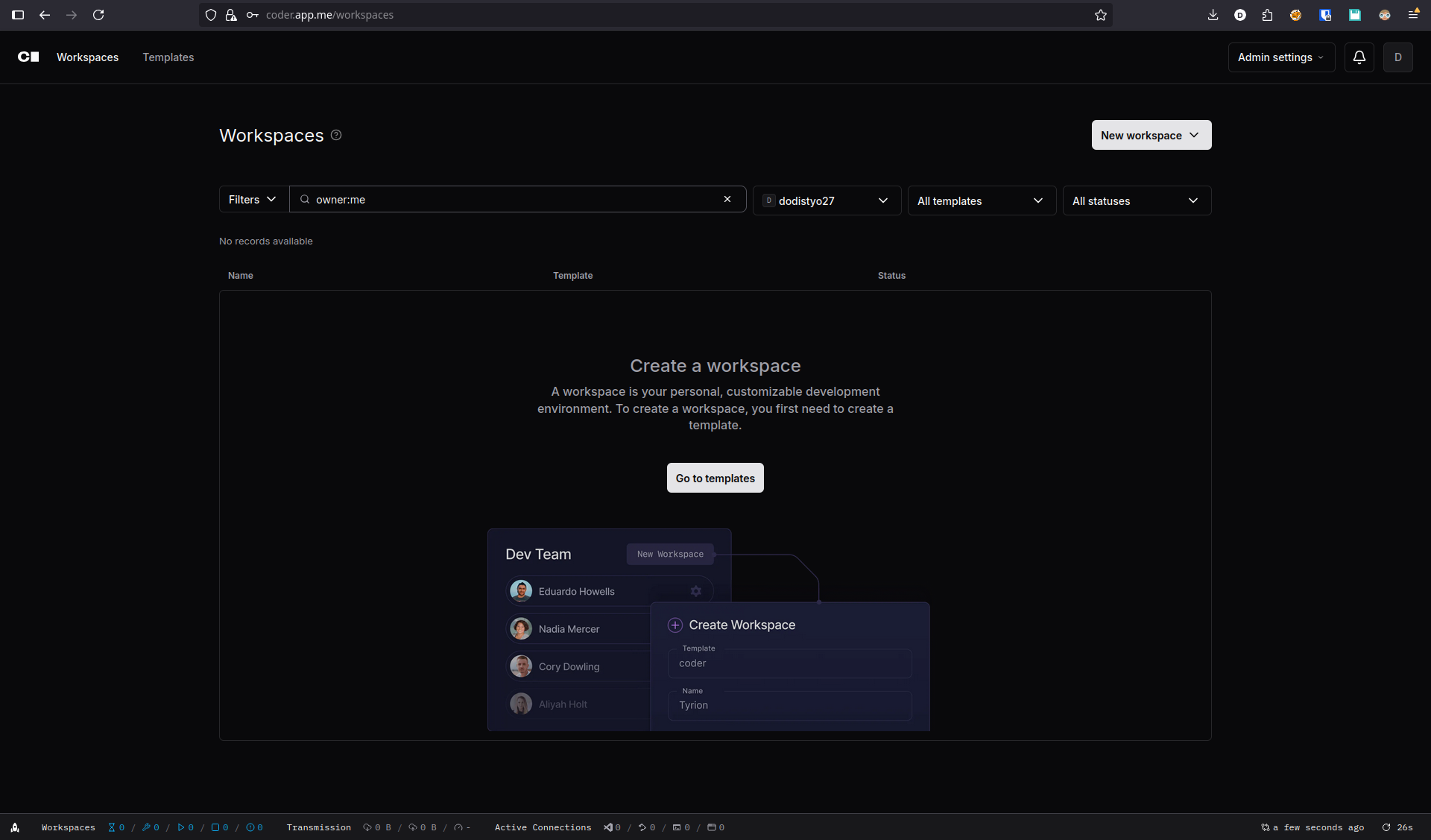
From there, we can create new template, either build it from scratch or using available template.
For this demo, we’ll just use existing template Kubernetes Deployment one.
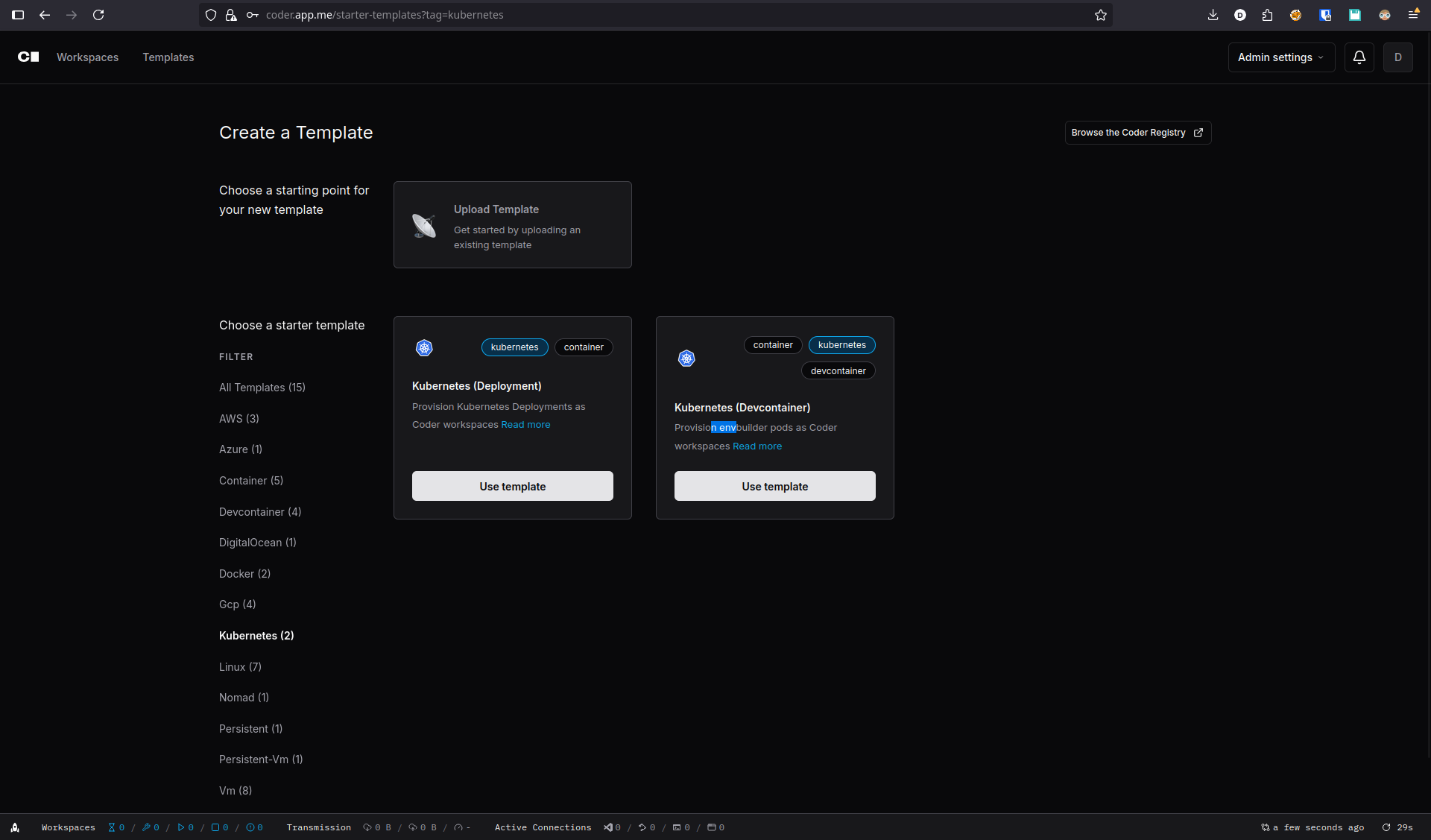
What’s good about coder is, it is using Terraform code to define workspace template. if you’re already familiar with IaC especially terraform, you will be comfortable creating template even from scratch.
Here is the terraform config example from template above.
terraform {
  required_providers {
    coder = {
      source = "coder/coder"
    }
    kubernetes = {
      source = "hashicorp/kubernetes"
    }
  }
}

provider "coder" {
}

variable "use_kubeconfig" {
  type        = bool
  description = <<-EOF
  Use host kubeconfig? (true/false)

  Set this to false if the Coder host is itself running as a Pod on the same
  Kubernetes cluster as you are deploying workspaces to.

  Set this to true if the Coder host is running outside the Kubernetes cluster
  for workspaces.  A valid "~/.kube/config" must be present on the Coder host.
  EOF
  default     = false
}

variable "namespace" {
  type        = string
  description = "The Kubernetes namespace to create workspaces in (must exist prior to creating workspaces). If the Coder host is itself running as a Pod on the same Kubernetes cluster as you are deploying workspaces to, set this to the same namespace."
}

data "coder_parameter" "cpu" {
  name         = "cpu"
  display_name = "CPU"
  description  = "The number of CPU cores"
  default      = "2"
  icon         = "/icon/memory.svg"
  mutable      = true
  option {
    name  = "2 Cores"
    value = "2"
  }
  option {
    name  = "4 Cores"
    value = "4"
  }
  option {
    name  = "6 Cores"
    value = "6"
  }
  option {
    name  = "8 Cores"
    value = "8"
  }
}

data "coder_parameter" "memory" {
  name         = "memory"
  display_name = "Memory"
  description  = "The amount of memory in GB"
  default      = "2"
  icon         = "/icon/memory.svg"
  mutable      = true
  option {
    name  = "2 GB"
    value = "2"
  }
  option {
    name  = "4 GB"
    value = "4"
  }
  option {
    name  = "6 GB"
    value = "6"
  }
  option {
    name  = "8 GB"
    value = "8"
  }
}

data "coder_parameter" "home_disk_size" {
  name         = "home_disk_size"
  display_name = "Home disk size"
  description  = "The size of the home disk in GB"
  default      = "10"
  type         = "number"
  icon         = "/emojis/1f4be.png"
  mutable      = false
  validation {
    min = 1
    max = 99999
  }
}

provider "kubernetes" {
  # Authenticate via ~/.kube/config or a Coder-specific ServiceAccount, depending on admin preferences
  config_path = var.use_kubeconfig == true ? "~/.kube/config" : null
}

data "coder_workspace" "me" {}
data "coder_workspace_owner" "me" {}

resource "coder_agent" "main" {
  os             = "linux"
  arch           = "amd64"
  startup_script = <<-EOT
    set -e

    # Install the latest code-server.
    # Append "--version x.x.x" to install a specific version of code-server.
    curl -fsSL https://code-server.dev/install.sh | sh -s -- --method=standalone --prefix=/tmp/code-server

    # Start code-server in the background.
    /tmp/code-server/bin/code-server --auth none --port 13337 >/tmp/code-server.log 2>&1 &
  EOT

  # The following metadata blocks are optional. They are used to display
  # information about your workspace in the dashboard. You can remove them
  # if you don't want to display any information.
  # For basic resources, you can use the `coder stat` command.
  # If you need more control, you can write your own script.
  metadata {
    display_name = "CPU Usage"
    key          = "0_cpu_usage"
    script       = "coder stat cpu"
    interval     = 10
    timeout      = 1
  }

  metadata {
    display_name = "RAM Usage"
    key          = "1_ram_usage"
    script       = "coder stat mem"
    interval     = 10
    timeout      = 1
  }

  metadata {
    display_name = "Home Disk"
    key          = "3_home_disk"
    script       = "coder stat disk --path $${HOME}"
    interval     = 60
    timeout      = 1
  }

  metadata {
    display_name = "CPU Usage (Host)"
    key          = "4_cpu_usage_host"
    script       = "coder stat cpu --host"
    interval     = 10
    timeout      = 1
  }

  metadata {
    display_name = "Memory Usage (Host)"
    key          = "5_mem_usage_host"
    script       = "coder stat mem --host"
    interval     = 10
    timeout      = 1
  }

  metadata {
    display_name = "Load Average (Host)"
    key          = "6_load_host"
    # get load avg scaled by number of cores
    script   = <<EOT
      echo "`cat /proc/loadavg | awk '{ print $1 }'` `nproc`" | awk '{ printf "%0.2f", $1/$2 }'
    EOT
    interval = 60
    timeout  = 1
  }
}

# code-server
resource "coder_app" "code-server" {
  agent_id     = coder_agent.main.id
  slug         = "code-server"
  display_name = "code-server"
  icon         = "/icon/code.svg"
  url          = "http://localhost:13337?folder=/home/coder"
  subdomain    = false
  share        = "owner"

  healthcheck {
    url       = "http://localhost:13337/healthz"
    interval  = 3
    threshold = 10
  }
}

resource "kubernetes_persistent_volume_claim" "home" {
  metadata {
    name      = "coder-${data.coder_workspace.me.id}-home"
    namespace = var.namespace
    labels = {
      "app.kubernetes.io/name"     = "coder-pvc"
      "app.kubernetes.io/instance" = "coder-pvc-${data.coder_workspace.me.id}"
      "app.kubernetes.io/part-of"  = "coder"
      //Coder-specific labels.
      "com.coder.resource"       = "true"
      "com.coder.workspace.id"   = data.coder_workspace.me.id
      "com.coder.workspace.name" = data.coder_workspace.me.name
      "com.coder.user.id"        = data.coder_workspace_owner.me.id
      "com.coder.user.username"  = data.coder_workspace_owner.me.name
    }
    annotations = {
      "com.coder.user.email" = data.coder_workspace_owner.me.email
    }
  }
  wait_until_bound = false
  spec {
    access_modes = ["ReadWriteOnce"]
    resources {
      requests = {
        storage = "${data.coder_parameter.home_disk_size.value}Gi"
      }
    }
  }
}

resource "kubernetes_deployment" "main" {
  count = data.coder_workspace.me.start_count
  depends_on = [
    kubernetes_persistent_volume_claim.home
  ]
  wait_for_rollout = false
  metadata {
    name      = "coder-${data.coder_workspace.me.id}"
    namespace = var.namespace
    labels = {
      "app.kubernetes.io/name"     = "coder-workspace"
      "app.kubernetes.io/instance" = "coder-workspace-${data.coder_workspace.me.id}"
      "app.kubernetes.io/part-of"  = "coder"
      "com.coder.resource"         = "true"
      "com.coder.workspace.id"     = data.coder_workspace.me.id
      "com.coder.workspace.name"   = data.coder_workspace.me.name
      "com.coder.user.id"          = data.coder_workspace_owner.me.id
      "com.coder.user.username"    = data.coder_workspace_owner.me.name
    }
    annotations = {
      "com.coder.user.email" = data.coder_workspace_owner.me.email
    }
  }

  spec {
    replicas = 1
    selector {
      match_labels = {
        "app.kubernetes.io/name"     = "coder-workspace"
        "app.kubernetes.io/instance" = "coder-workspace-${data.coder_workspace.me.id}"
        "app.kubernetes.io/part-of"  = "coder"
        "com.coder.resource"         = "true"
        "com.coder.workspace.id"     = data.coder_workspace.me.id
        "com.coder.workspace.name"   = data.coder_workspace.me.name
        "com.coder.user.id"          = data.coder_workspace_owner.me.id
        "com.coder.user.username"    = data.coder_workspace_owner.me.name
      }
    }
    strategy {
      type = "Recreate"
    }

    template {
      metadata {
        labels = {
          "app.kubernetes.io/name"     = "coder-workspace"
          "app.kubernetes.io/instance" = "coder-workspace-${data.coder_workspace.me.id}"
          "app.kubernetes.io/part-of"  = "coder"
          "com.coder.resource"         = "true"
          "com.coder.workspace.id"     = data.coder_workspace.me.id
          "com.coder.workspace.name"   = data.coder_workspace.me.name
          "com.coder.user.id"          = data.coder_workspace_owner.me.id
          "com.coder.user.username"    = data.coder_workspace_owner.me.name
        }
      }
      spec {
        security_context {
          run_as_user     = 1000
          fs_group        = 1000
          run_as_non_root = true
        }

        container {
          name              = "dev"
          image             = "codercom/enterprise-base:ubuntu"
          image_pull_policy = "Always"
          command           = ["sh", "-c", coder_agent.main.init_script]
          security_context {
            run_as_user = "1000"
          }
          env {
            name  = "CODER_AGENT_TOKEN"
            value = coder_agent.main.token
          }
          resources {
            requests = {
              "cpu"    = "250m"
              "memory" = "512Mi"
            }
            limits = {
              "cpu"    = "${data.coder_parameter.cpu.value}"
              "memory" = "${data.coder_parameter.memory.value}Gi"
            }
          }
          volume_mount {
            mount_path = "/home/coder"
            name       = "home"
            read_only  = false
          }
        }

        volume {
          name = "home"
          persistent_volume_claim {
            claim_name = kubernetes_persistent_volume_claim.home.metadata.0.name
            read_only  = false
          }
        }

        affinity {
          // This affinity attempts to spread out all workspace pods evenly across
          // nodes.
          pod_anti_affinity {
            preferred_during_scheduling_ignored_during_execution {
              weight = 1
              pod_affinity_term {
                topology_key = "kubernetes.io/hostname"
                label_selector {
                  match_expressions {
                    key      = "app.kubernetes.io/name"
                    operator = "In"
                    values   = ["coder-workspace"]
                  }
                }
              }
            }
          }
        }
      }
    }
  }
}
The workspace also versioned so it will be easy to revert changes since every changes is tracked.
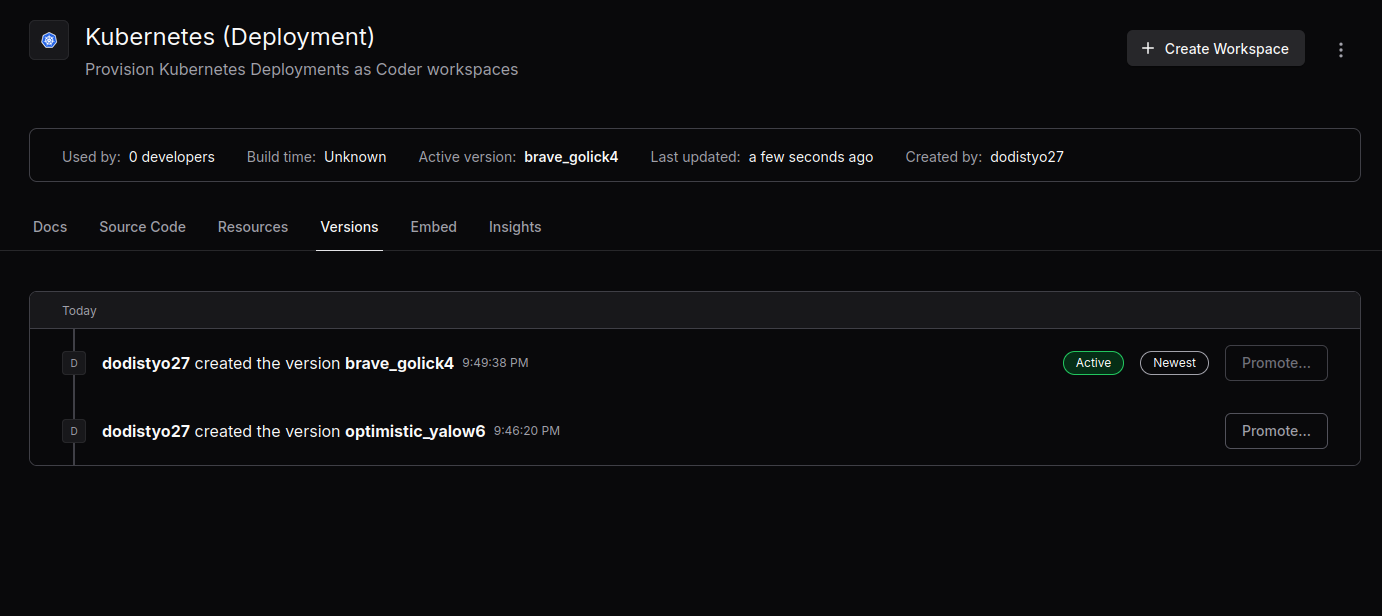
Once the workspace template created, you can share it to other users so they can use it.
Using
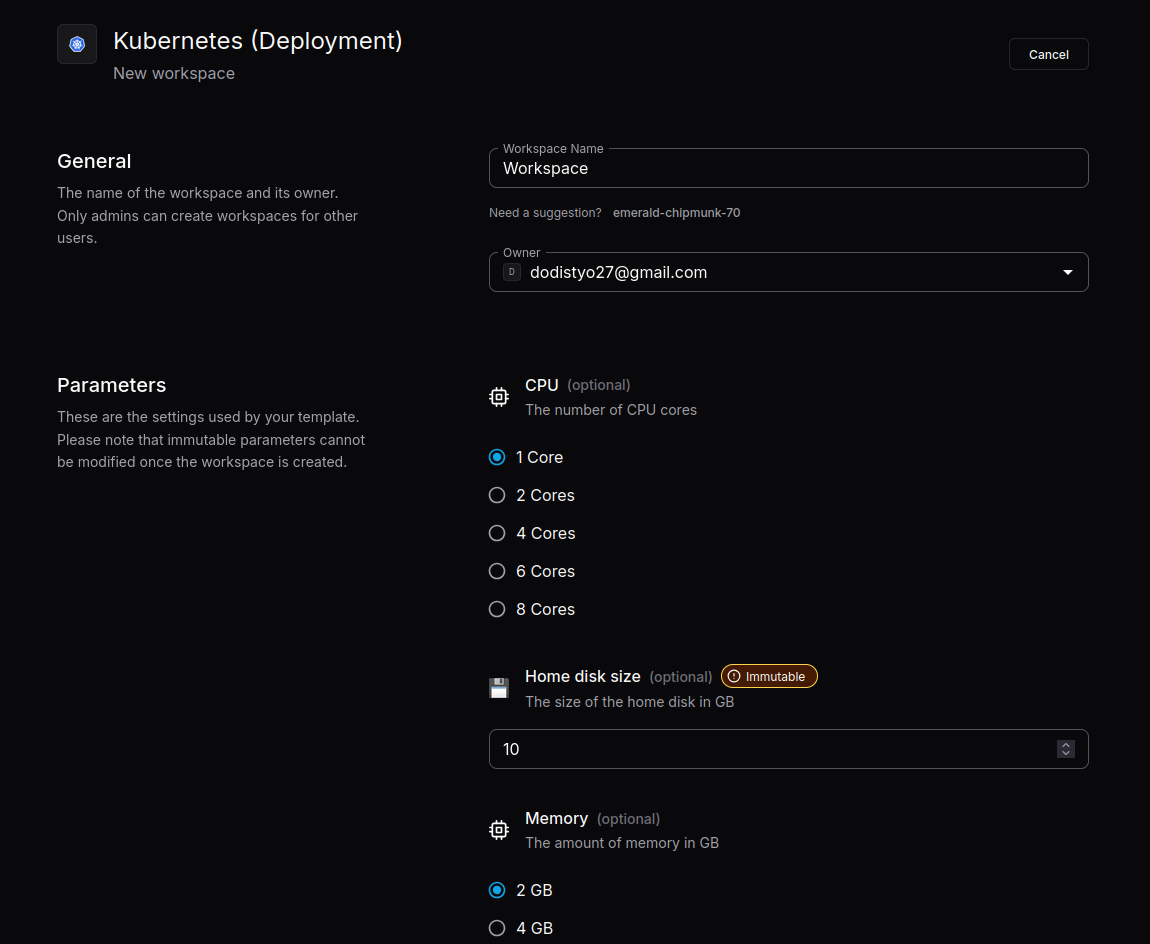
Run the workspace, fill the parameter defined and it will take some time to spin up a workspace for user.
it will deploy a k8s pod managed by a single deployment per user workspace.
onece it’s provisioned, it is ready to use.
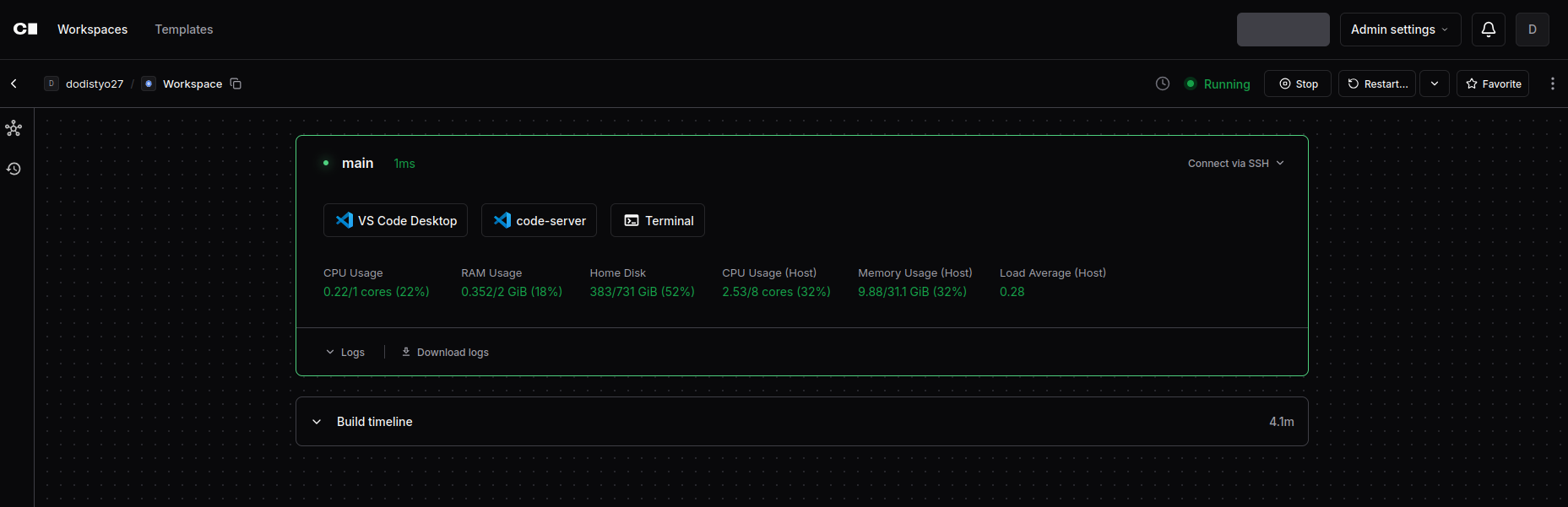
Now you can basically open VSCode from the browser and native terminal browser.
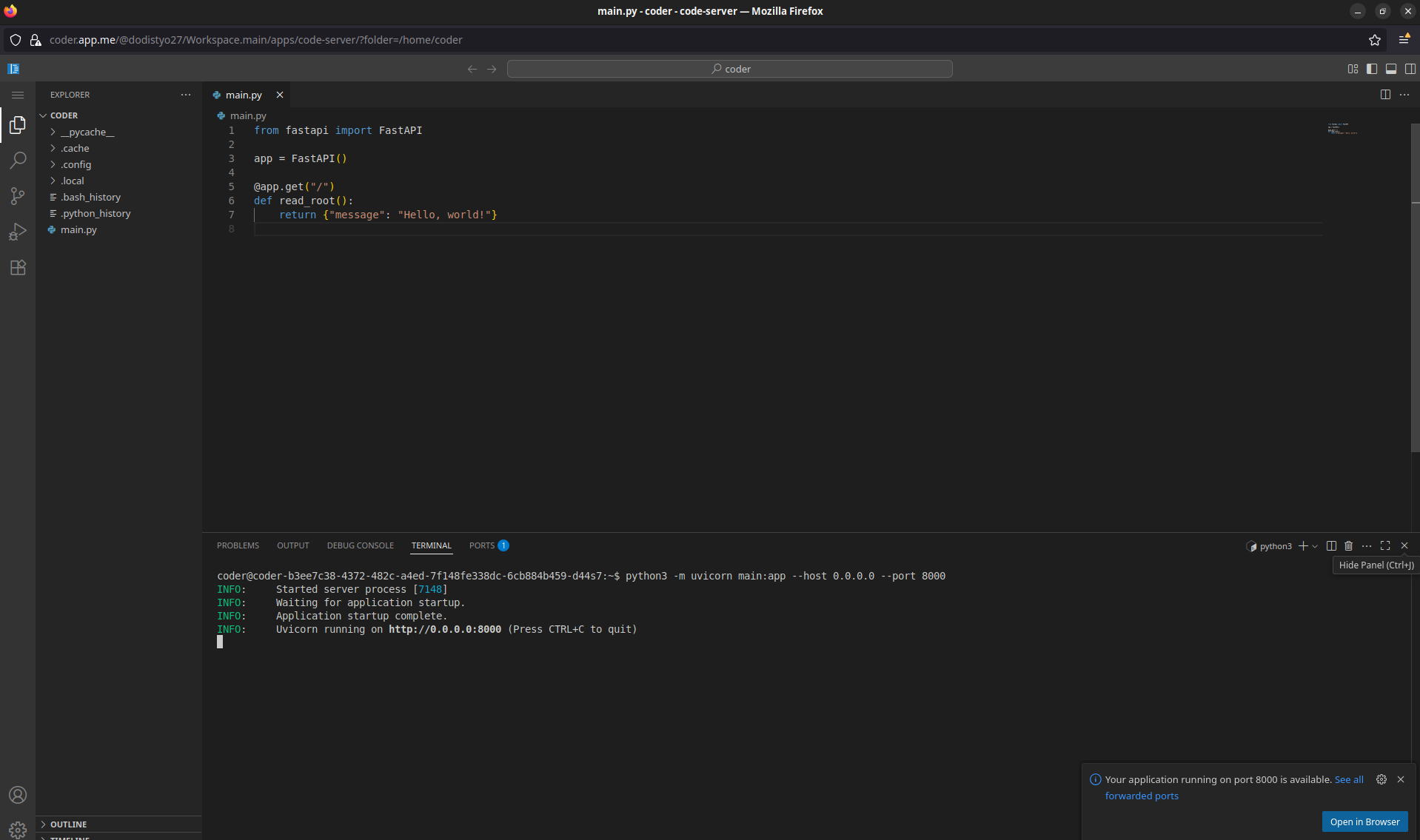
And let’s create a simple coding project using python for testing, and try to directly run in from IDE termial
Look, it automatically do the proxying and port forwarding.
That way we can access your executed project from within the browser.
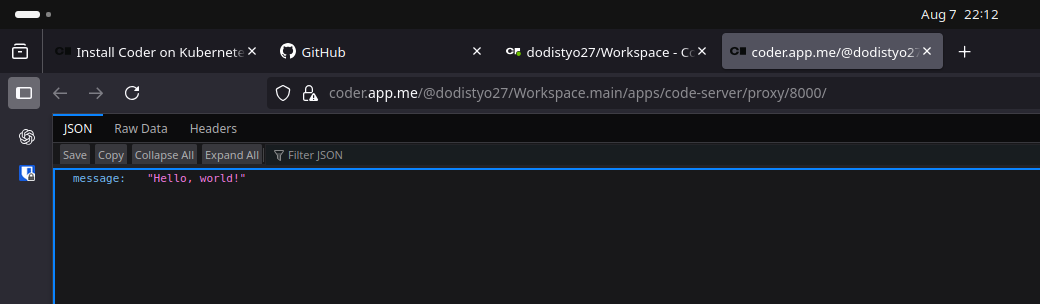
Just like a GitHub Codespace, right?
The Takeaways
Benefits
- Full Dev Experience, All tools available right in your browser.
- Terraform-based Workspaces, Consistent setup via Infrastructure as Code.
- Unified Developer Setup, Same environment across the team (including presetup IDE extension and config).
- Using container image for the workspace, so we can basically bake our own image and install all necessary tools in it.
- Since it runs on top of kubernetes, we can leverage the kubernetes dynamics for managing workspace. such as scaling down to zero.
- No high end PC required to write codes since all of the workspces will be run on the cloud
Challenge & Improvement
- Could we run container inside the workspace? we could actually, but a bit tricky, complex and unsecure if you don’t do it right.
- It may break your app sometimes if your apps don’t support to work behind proxy
- Native mobile and desktop development? I honestly don’t know if it’s possible.
- Do all VSCodes extensions works? Not all, but most of it works.
- If it is hosted in the managed kubernetes on cloud provider, we can use Spot VMs or Preemptible VMs to cut down cost even more. (up to 80% cheaper)
- Build your own custom image, if you need to install package/tools that is small or light, you can add the installation step in workspace startup script without rebuilding your custom image.